If you have ever tried to connect a new camera to an existing smart home and found yourself juggling three apps, two logins, and an outdoor ladder, you know integration matters as much as hardware specs. The best camera system is the one you can actually use, every day, without friction. Over the last decade I have installed and maintained systems that range from $150 DIY kits to multi-thousand dollar NVRs, often mixing brands when budgets demanded it. The pattern is clear. Choose the right platform first, then pick cameras that play nicely with it. Everything else flows from those decisions.
Below, I will map out the current landscape of smart home integration with CCTV, including which platforms do what well, which cameras excel at which jobs, and how to think about privacy, storage, and long term ownership. I will add concrete comparisons around video doorbells vs CCTV, motion detection for homes, and night vision performance, along with practical advice that helps in a city context like Fremont, where a typical suburban home might face a street, a side gate, and an alley, each with different lighting and mounting challenges. If you want affordable home camera systems that do not turn into a second job, start here.
Start with your platform, then your cameras
The smartest way to build a surveillance setup is to commit to a platform that suits your priorities, then populate it with compatible devices. Broadly, you have six viable directions today: Apple Home, Google Home, Amazon Alexa, Home Assistant, Blue Iris, and vendor ecosystems such as Hikvision/UniFi/Arlo/Eufy. Each brings trade-offs in privacy, automation depth, and cost.
Apple Home with HomeKit Secure Video leans hard into privacy. Video analysis happens on your home hub, and footage stores in iCloud with strong controls over sharing and notifications. If you live deep in the Apple ecosystem and value clean, predictable notifications and face recognition that respects privacy, HomeKit works beautifully. The rub is camera selection. Only some cameras support HSV, many cap resolutions for cloud recordings, and you will pay for iCloud storage tiers. If you need more than five cameras or want flexible retention, plan carefully.
Google Home has improved, though fragmentation remains. Nest cameras integrate smoothly and produce handsome video, but older Nest Aware features and newer Google Home automations still feel like two eras bolted together. If you like Google’s facial recognition and quick event scrubbing, and you want low-maintenance devices that just stay online, Nest can be a good fit. You will live in Google’s subscription world, and you will be happiest if you do not try to combine too many non-Nest cameras.
Amazon Alexa is the most open for basic control but offers limited native video history features compared to Nest or HomeKit. Where Alexa shines is breadth. Tons of camera brands offer Alexa skills, so you can show a live feed on Echo Show screens and tie motion events into routines. If your home already runs on Alexa and you want voice and display integration, you will get a smooth baseline experience. For deep analytics and archival retention, you will still rely on each camera’s app or a dedicated NVR.
Home Assistant serves homeowners who want real control and do not mind a learning curve. It integrates with nearly everything, from RTSP camera streams to cloud-only products, and it lets you build automations that feel tailor-made. If you have multiple brands already or want to add automations based on motion zones, object detection, or door sensors, this is your best tool. Expect to spend time configuring and maintaining, especially if you self-host storage. The reward is flexibility and independence from vendor clouds.
Blue Iris is a Windows application that turns a PC into a robust NVR. It ingests most IP cameras via ONVIF or RTSP, supports advanced motion detection, and hands you per-camera control over bandwidth, framerates, and profiles. I recommend it when someone wants pro-level features on prosumer hardware without monthly fees, and when they do not mind tinkering with bitrates and substreams. You will still want UPS backup power, healthy storage arrays, and a plan for remote access that prioritizes security.
Vendor ecosystems like UniFi Protect, Hikvision/ColorVu, Reolink, Arlo, and Eufy can simplify your life as long as you accept their boundaries. UniFi Protect is the smoothest right now for homeowners who like wired stability and value a single pane of glass. Hikvision gives you a huge catalog and excellent low-light cameras but requires careful network hardening and scrutiny for firmware updates. Reolink occupies the value tier with surprisingly competent PoE cameras that integrate well via RTSP. Arlo and Eufy lead in wire-free convenience and app polish, though each has had public debates around cloud architecture and encryption over time. If your priority is quick installation and simple remote access, a well-chosen vendor ecosystem can be the fastest route to dependable coverage.
Wire it right, and the rest gets easier
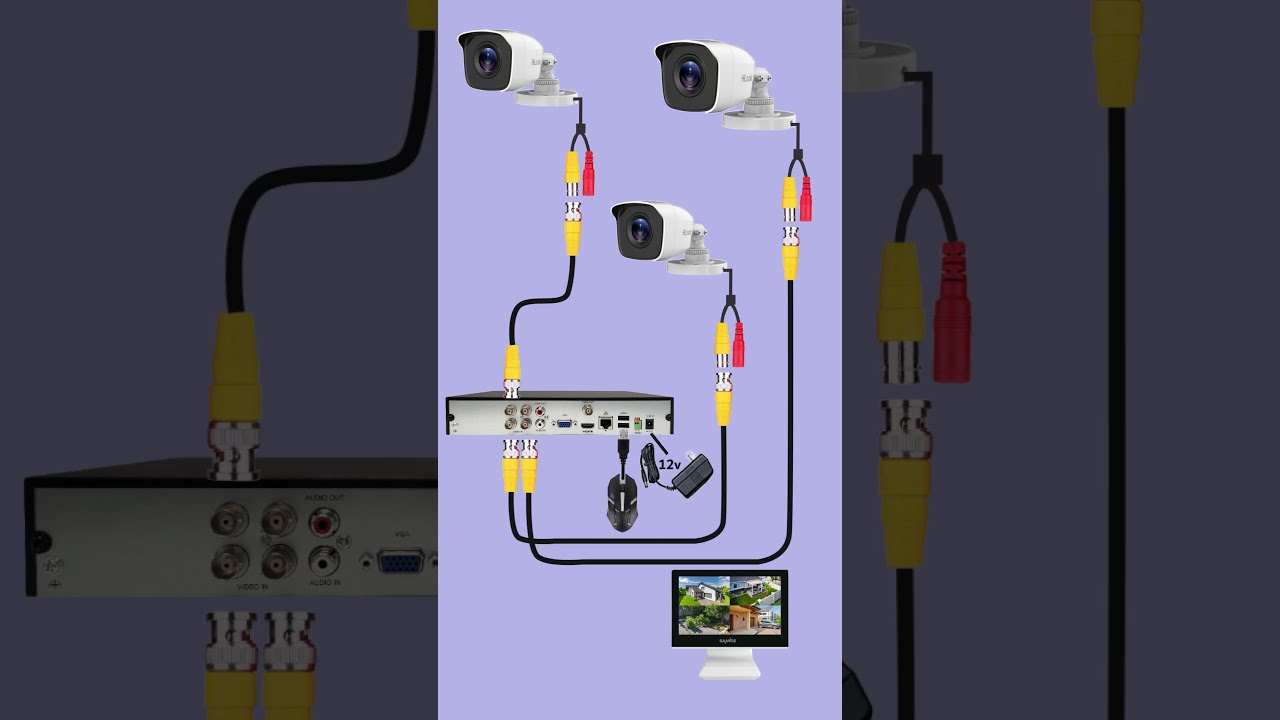
When I see problems in the field, they rarely come from camera optics. They almost always come from power, networking, or mounting. A half-beat of planning avoids most headaches. For homes in Fremont or similar suburbs, I often pull Cat6 to eaves and fence lines, then run PoE cameras back to a small managed switch and either a UniFi Protect NVR or a Blue Iris PC. PoE solves two problems at once, power and data, and it works in heat or cold without fuss. If running cable is impossible, I look for cameras that support both Wi-Fi and RTSP, so they can live in a vendor app while also feeding a local recorder.
Bandwidth matters more than people think. Four 4K cameras at 15 Mbps each will outrun a weak mesh node. If you stream to the cloud and to a local NVR, you effectively double uplink demand. Balance the system with substreams for motion analysis and a single main stream for recording. A good configuration might be 4K at 8 to 10 Mbps for recording, plus a 640x360 substream under 1 Mbps for analysis and quick preview. You will barely notice the traffic on a wired network, and your phone’s thumbnails will load instantly.
Finally, mount cameras where they observe, not just where they look pretty. A porch camera should sit above hand height and angled slightly down so it captures faces approaching the door. A driveway camera does its best work 10 to 12 feet off the ground looking across the vehicles, not from a garage soffit staring at the sky. Avoid pointing at public streets whenever possible for privacy and to cut irrelevant motion. If you cannot avoid it, use motion zones aggressively.

Video doorbells vs CCTV: different jobs, different wins
A video doorbell is a presence device, not a comprehensive security camera. It gives you two-way audio, door-specific notifications, and fast snapshots of visitors or packages. It produces frequent but short events. A CCTV camera is an area device. It watches a zone for longer recordings, with larger sensors that handle motion and night scenes better. If you use a doorbell as your only camera, you will miss the side gate, driveway blind spots, and the pattern of someone checking cars at 3 a.m.
I prefer a layered approach. One good doorbell that integrates with your chosen platform, plus two to four fixed cameras that cover driveway, yard, and any vulnerable side path. If budget is tight, start with the doorbell and one driveway camera. That pairing solves 80 percent of what families worry about day to day.
Doorbell choice often hinges on platform. Nest Doorbell meshes with Google’s notifications and face recognition. Ring plays best in an Alexa household and has a broad accessory ecosystem. Eufy offers local storage models that avoid monthly fees, though you should keep firmware current and review encryption settings. If you live in an Apple-first home, the few doorbells that support HomeKit or HomeKit Secure Video provide cleaner integration with minimal fuss. Whichever you choose, test the chime and transformer. Too many installations suffer from voltage sag and intermittent offline behavior that traces to a tired 16 V transformer.
Motion detection for homes: avoid false alerts without missing the important stuff
Motion detection has improved, but it still relies on your setup. A camera pointed at traffic will nag you every few minutes, and even smart object detection gets noisy with headlight beams and shadows. The best configuration isolates the foreground zone where a person would walk, uses a substream for trigger evaluation, and burns in a short pre-roll so you see the approach before the event.
Modern cameras offer person, vehicle, and package detection. Take advantage of them. If your driveway sits in view of the street, enable person and vehicle detection, then draw a zone that excludes the far curb. If your side yard is quiet, enable all motion and keep a longer clip length to catch fence rattling or a gate being tested. For home burglary prevention, I often set up dual triggers: a camera-based detection for quick alerts, and a more conservative NVR-based detection that filters events for storage efficiency. When both agree, mark it as high priority and send a notification with a snapshot to family phones.
Lighting is the other half of motion reliability. You will get far fewer false events in the evening if you add a warm LED flood or a motion-activated porch light. Cameras with integrated spotlights can help, but do not overdo it. Too much light aimed at a narrow area can create harsh contrast that hinders identification. Balanced ambient light provides more useful video.
Night vision camera guide: color at night versus IR
Night performance used to mean monochrome IR images full of grain and glowing eyes. That has improved. Color night vision uses larger sensors, wider apertures, and low-light algorithms to produce usable color images at 0.1 lux or lower. Hikvision’s ColorVu line and Reolink’s newer models do this well for the price. UniFi has cameras that balance color retention with clean, low-noise detail. Expect color to hold in areas with even minimal ambient light, like a street lamp reflecting off a driveway. In a pitch-black backyard, you will still fall back to IR unless you add illumination.
Infrared has a place. For perimeters, IR ranges quoted by vendors are optimistic. A camera rated for 100 feet of IR may deliver facial detail inside 40 to 60 feet depending on humidity and background reflectivity. If you truly need long range at night, look for a camera with external IR support and narrow FOV optics, or add a standalone IR flood that you can aim. For most homes, a 2.8 mm lens with onboard IR and a moderate FOV gives a good mix of situational awareness and detail. If you need a plate read on a driveway at night, you want a dedicated camera with a 6 to 12 mm lens aimed low, IR tuned to avoid reflection, and shutter speeds fast enough to freeze motion. That is a specialized setup and works best on a local NVR where you control exposure and WDR.
Picking the best cameras for home security given your platform
Start with your integration needs. If you want cloud simplicity, the short list includes Nest, Ring, Arlo, and Eufy. If you want local control and no monthly fees, look at UniFi Protect, Reolink PoE with Blue Iris or Home Assistant, and Hikvision/ColorVu for low-light strength with ONVIF compatibility. I keep coming back to a handful of standouts:
- UniFi G4 and G5 series for clean integration, manageable PoE, and dependable updates. Protect’s mobile app is fast, and UniFi’s ecosystem covers doorbells, cameras, and network gear in one stack. Reolink 8 MP PoE domes or bullets for affordable home camera systems that still offer RTSP/ONVIF, decent color at night, and acceptable build quality. They pair well with Blue Iris or a Reolink NVR. Hikvision ColorVu or equivalent low-light models for challenging night scenes where you need color and detail. Use with a hardened NVR and keep firmware current. Their turrets handle rain and glare better than bullets in many installs. Nest Cam and Nest Doorbell for Google households that value polished AI detection and easy sharing, at the cost of recurring Nest Aware fees and less granular control. Eufy wired doorbell and indoor cams if you want local storage and basic cloud independence, with the caveat that you should read current security audits and lock down remote access.
A note on domes vs bullets vs turrets. Domes look discreet and resist tampering when mounted low, but they can gather condensation in humid climates and reflect IR at night if the inner dome gets dusty. Bullets shed water, are easier to aim, and often have better IR separation, though they are more conspicuous. Turrets split the difference, with exposed lenses that avoid reflection artifacts and a compact profile. For Fremont’s mild climate, turrets and bullets often beat domes for night clarity.
Smart home integration with CCTV: what “good” looks like day to day
A good system means you can do three things quickly from your phone or a wall panel. First, check a live view with minimal delay. Second, scrub the last hour of video for a specific moment without scrolling through a thousand thumbnails. Third, receive meaningful alerts only when something you care about happens. Integrations make this possible.
In an Apple household, a HomeKit Secure Video camera sends a concise notification with a face label if it recognizes a family member. You can tap straight into the event and pull earlier footage from iCloud with a smooth timeline. The same camera can trigger a HomeKit scene that turns on lights, unlocks a smart lock for a trusted visitor, and sends audio to a HomePod if a person is detected at the door after dark.
In a Google home, a Nest Doorbell tells you a package arrived at 2:14 p.m., and a Nest Cam’s familiar face alert differentiates your neighbor from a stranger. Automations can switch your thermostats into Eco when nobody is seen for a while, and your voice displays can show the driveway feed during garage door activity.
With Home Assistant or Blue Iris, the integrations go deeper. A side gate contact sensor triggers your backyard camera to bump bitrate and frame rate for two minutes. If a person is detected while your security system is armed, HA turns on specific exterior lights and sends a Telegram message with a three-frame GIF for context. Blue Iris overlays a plate snapshot from your driveway camera onto the timeline, so you find clips by plate number, not just time.
Privacy, retention, and responsible use
Cameras can make your family safer when used with respect for privacy. Position cameras to watch your property, not your neighbor’s yard or public windows. Use privacy masks generously. In a city like Fremont where corners can be tight, aim for zones that see approach paths and entrances rather than the entire sidewalk. Tell guests and contractors you record video around the exterior and audio at the doorbell. It prevents awkward surprises and builds trust.
For storage, define retention by location. High-traffic cameras like a front door or driveway do not need 30 days of full-res video. Seven to ten days with event markers suits most needs and keeps disk usage in check. Quiet perimeter or sensitive areas benefit from longer retention, 14 to 30 days, especially if you travel. If you use cloud storage, review what resolution you actually get and for how long. Many plans store full resolution for a shorter time and then keep lower resolution clips.
If you opt for local NVRs, secure them https://tituskihn815.image-perth.org/property-insurance-meets-security-systems-getting-the-coverage-your-tech-deserves like you would a home server. Unique passwords, two-factor for remote access, and no direct port forwarding without a VPN. If you go with a vendor cloud, keep your account recovery information updated and audit shared access every few months. People change phones and email addresses. Access lingers unless you prune it.
Installation notes that save time and money
Measure real-world Wi-Fi before you mount a wireless camera. A phone speed test is not the final answer, but it will tell you if a camera 35 feet from a mesh node will actually hold a 1080p stream. If you see less than 5 to 10 Mbps stable upload at that location, either run cable or install a closer access point. Running one line of Cat6 takes an afternoon and pays for itself in reliability.
When drilling through exterior walls, aim slightly downward to keep water out. Seal with a proper exterior-grade sealant, and use cable grommets so vibration does not chew through insulation. If you must run along soffits, staple loosely with insulated clamps rather than tight zip ties. Heat cycles cause movement. Tight ties cut into sheathing over time. Label both ends of every cable. Future you will thank you.
Keep a small kit: a low-voltage tester, PoE injector, a short patch cable, spare pigtails, and a microSD card. Many cameras support an SD card for short-term buffer recording. It will save your footage during a brief NVR outage and give you direct access to clips when troubleshooting.

DIY home surveillance without the headaches
You can put together a capable DIY home surveillance system over a weekend if you scope it well. For a practical setup, pick one of two paths. Either go pure vendor ecosystem, like a UniFi Protect NVR with three or four G4/G5 cameras and a UniFi doorbell. Or go hybrid, with a Reolink PoE kit feeding Blue Iris or Home Assistant, and a doorbell that integrates into your preferred voice/display ecosystem. In both cases, define two or three motion zones, tune sensitivity for a day, and live with your notifications for a week before changing anything else. Most people overtune on day one and chase their tail.
The cost breakdown for a typical suburban home often lands between $450 and $1,800 depending on camera count and storage. A solid affordable home camera system might include a $300 PoE kit with four 5 MP cameras, a $120 PoE switch, a $100 used small-form-factor PC running Blue Iris, and a $100 hard drive. You will invest sweat equity instead of subscriptions. On the higher end, a UniFi Protect setup with four 4K cameras and an NVR can run $1,200 to $1,800, with a cleaner app experience and less tinkering.
Where a pro helps
If you have a tile roof, a three-story exterior, or a complicated electrical layout, paying a pro installer can cost less than a broken tile and a weekend on a ladder. In cities like Fremont, local pros also know code requirements, HOA quirks, and how to fish cable cleanly through stucco walls. Ask for references that match your house type, request a network diagram with device IPs and VLAN guidance, and get clarity on who updates firmware after install. I prefer arrangements where the homeowner retains admin credentials, and the installer documents changes. It avoids lock-in and leaves you in control.
Family safety technology, beyond cameras
Cameras do not replace basic measures. Lock hardware that resists bumping, a door with a reinforced strike plate, window sensors on ground floor casements, and lighting that follows predictable schedules all contribute more to home burglary prevention than a single 4K camera ever will. Link your surveillance system to those basics. A back door sensor that opens while away should queue a camera snapshot to everyone’s phones. A garage door left open past 9 p.m. should ping you with a still image of the driveway so you can close it with context.
In homes with teens or older relatives, consider privacy zones and automation schedules that avoid turning your house into a panopticon. You want safety, not surveillance theater. Clear rules like no indoor cameras in bedrooms and camera notifications muted when the family is home can make technology feel supportive rather than oppressive.
Practical recommendations by scenario
For a small starter home or townhome, start with a reliable video doorbell, one wired PoE camera covering the driveway or entry path, and a smart light strategy that supports both. If you favor Google, a Nest Doorbell plus a single Nest Cam works fine, with Nest Aware for event history. If you want local storage and fewer fees, an Eufy wired doorbell paired with a Reolink 5 MP PoE turret and an inexpensive NVR or Blue Iris gets you most of the utility with fewer recurring costs.
For a mid-size single-family home, wire three to five PoE cameras to cover the front approach, driveway, backyard, and side gate. Choose a platform that fits your taste for maintenance. UniFi Protect is the least fiddly among local options. Add a doorbell in the same ecosystem if possible, or accept a separate app if you strongly prefer a particular doorbell feature. Keep retention at 10 to 14 days on event recording and switch to continuous recording only where you really need it.
For large lots or homes with long driveways, use one camera specifically tuned for license plate capture at the choke point. Place it low, narrow the field of view, and keep exposure under control. Supplement with wide-angle cameras for general context. Consider a dedicated IR illuminator with a shield to avoid glare. This type of setup benefits from Blue Iris or a high-end NVR where you can dial imaging parameters with precision.
Home security tips Fremont residents often overlook
Mild coastal weather lulls people into leaving side gates unlocked and garage doors cracked for airflow. Most opportunistic theft happens when someone notices a pattern, not when they bring tools and a plan. If packages disappear twice in a month, do not just add another camera. Shift deliveries to a lockable box, change the porch lighting schedule, and aim a camera to catch approach rather than the door mat. If car rummaging occurs on your street, a camera that sees the sidewalk may be less helpful than motion lighting plus a low-aimed camera that captures faces at the car door. The combination of subtle environmental changes and good coverage discourages repeat attempts.
Putting it all together without overwhelm
The trick to smart home integration with CCTV is to stop thinking in brands and start thinking in jobs. One device watches the door and supports conversation with visitors. Two or three watch zones where people would move if they intended harm. A platform ties those events to lights, locks, and alerts that you control. Choose cameras you can power and network reliably, then integrate them enough to reduce friction in your daily routine. No single feature replaces a coherent plan.
If you want a simple starting recipe that balances cost, quality, and control, this one works reliably. Use a PoE switch and three PoE cameras: one at the front corner to see the approach, one above the driveway looking across cars, and one covering the side gate or backyard. Add a video doorbell that fits your voice/display ecosystem. Record locally with either a modest NVR or Blue Iris on a small PC, keep event retention for 10 days, and enable person detection for the two most important cameras. Tie motion after dark to exterior lights for 90 seconds. Share view-only access with family members and keep admin credentials to yourself. Test, adjust zones, and resist the urge to overcomplicate.
You will end up with a home that feels watched when it should be, quiet when it should be, and easy to manage even on a busy week. That is what a smart home with CCTV is supposed to deliver.